DotNetDevMCP
DotNetDevMCP is an MCP server that gives AI coding agents the compiler’s view of your .NET
solution. Instead of grep and guessing, your agent can find real references, rename a symbol across the solution with a
compile check, build, and run only the tests your change can break.
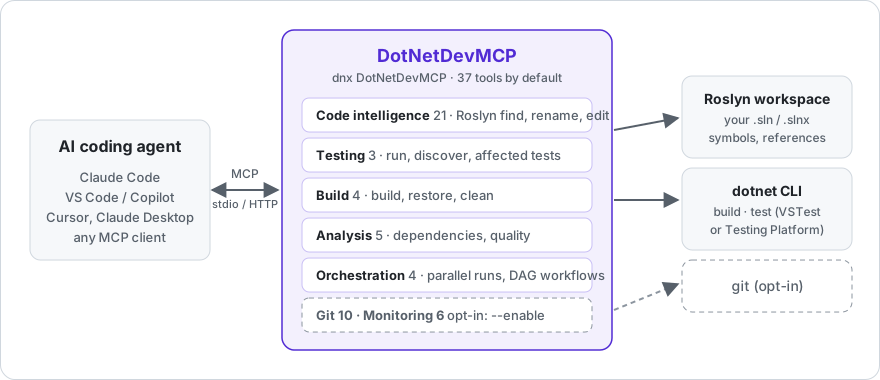
Start here
| I want to… | Page |
|---|---|
| Install it in Claude Code, VS Code, Visual Studio, Cursor or Claude Desktop | Installation |
| See what a first session looks like, step by step | Tutorial |
| Know every tool and its parameters | Tools Reference |
| Understand how affected tests are chosen, and when it runs everything | Affected Tests |
Change server options (--load-solution, --enable, HTTP mode…) |
Configuration |
| Fix something that isn’t working | Troubleshooting |
| See real numbers on a real library | Benchmarks |
| Know what it can do on my machine, and how to limit it | Security |
| Understand the code before contributing | Architecture |
| Help out | Contributing |
In one minute
claude mcp add dotnetdevmcp -- dotnet dnx DotNetDevMCP --yes
Then ask your agent: “Load MySolution.sln and tell me where OrderService.Submit is used.”
Requires the .NET 10 SDK. Package: nuget.org/packages/DotNetDevMCP.
Also listed in the MCP Registry as io.github.csa7mdm/dotnetdevmcp.
Something missing or wrong?
This wiki is open to edits: fix it directly. For bugs, open an issue; for questions, use Discussions.